How to Build a Shopify Store and Automate Product Fulfillment with DSers
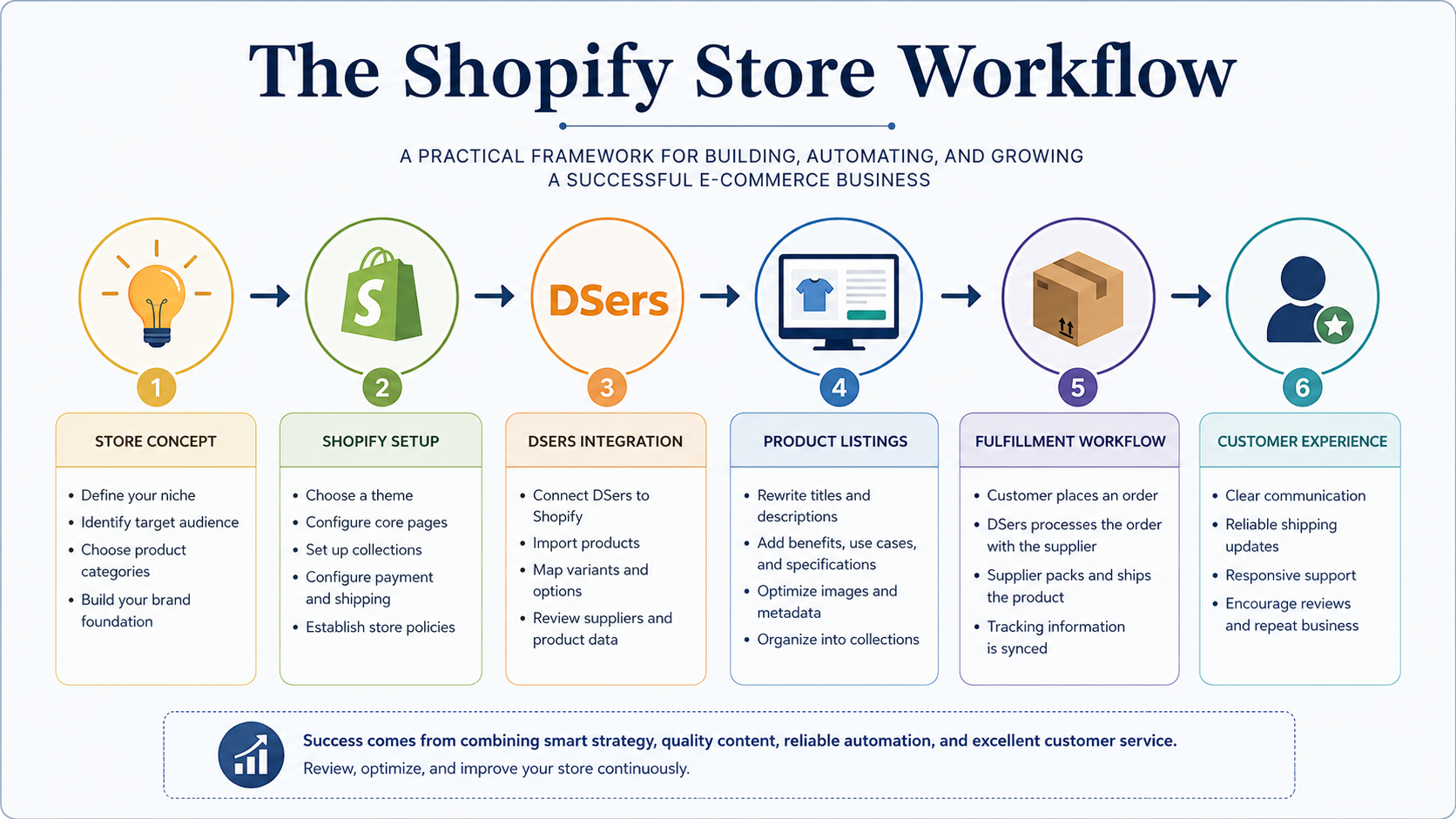
Building a Shopify store is often presented as a simple sequence: open an account, choose a theme, import products, connect a fulfillment app, and wait for orders. That version of the process is attractive because it makes e-commerce appear almost automatic. In practice, however, a functional Shopify store requires far more than technical setup. It requires a coherent store concept, careful product selection, strong product pages, clear customer communication, realistic fulfillment expectations, and regular review.
DSers can support an e-commerce workflow by helping connect Shopify with supplier-side dropshipping processes. It can assist with product importing, supplier management, order processing, and fulfillment organization. Yet automation does not replace judgment. A store owner still has to decide which products belong in the catalog, how those products should be described, what customers need to know before purchasing, and how the overall store should present itself.
This article explains how Shopify, DSers, product content, AI-assisted workflows, and operational review can work together. It is not a promise of effortless revenue. It is a practical guide to building a more organized Shopify store and treating automation as one part of a larger e-commerce system.
Start With the Store Concept Before Importing Products
One of the most common mistakes in new Shopify stores is beginning with products before defining the store itself. Product importing can be fast, especially when using a tool such as DSers, but speed can create disorder if the store has no clear identity. A catalog filled with unrelated items may technically function, but it rarely feels deliberate to a visitor.
Before importing products, the store owner should define the store’s purpose. Is the store focused on practical household solutions, pet products, seasonal accessories, convenience items, lifestyle goods, beauty tools, tech gadgets, or a broader general-store model? A general store can still work, but it needs internal logic. Products should feel connected by audience, use case, price range, problem, or shopping behavior.
This concept affects every later decision. It shapes the homepage, navigation, collections, product titles, descriptions, photography standards, metadata, email tone, and social content. It also helps determine which products should be excluded. Not every interesting product belongs in the store.
Before adding products, answer these questions:
Who is the intended customer?
What types of products belong in the catalog?
What problem, desire, or convenience does the store address?
What tone should the brand use?
Which products would weaken the store’s coherence?
How should products be grouped into collections?
A clear concept does not guarantee success, but it prevents the store from becoming a random assortment of imported listings. It gives the business a foundation.
Build the Shopify Foundation Before Adding Automation
Automation is most useful when the storefront already has structure. Before connecting DSers or importing a large product catalog, the basic Shopify foundation should be in place. That means choosing a clean, mobile-friendly theme, setting up navigation, creating essential pages, configuring payment options, reviewing shipping information, and preparing policies.
Customers evaluate credibility quickly. If the store has incomplete pages, unclear navigation, vague policies, inconsistent branding, or weak product descriptions, visitors may leave before they ever consider purchasing. The fulfillment workflow behind the scenes may be efficient, but the customer only sees the public-facing store.
At minimum, a Shopify store should have clear versions of the following pages:
Home
Catalog or Shop
Collections
About
Contact
Shipping Policy
Return Policy
Privacy Policy
Terms of Service
Collections also matter. A visitor should not have to browse an unorganized product dump. Collections should help customers understand what the store sells and where to begin. For example, a practical product store might organize items by Home, Pets, Car Accessories, Travel, Seasonal Finds, or Everyday Essentials. The categories should feel intuitive rather than arbitrary.
Product page templates should also be considered before importing products at scale. If every product page follows a different structure, the store begins to feel inconsistent. A repeatable format creates a more professional experience.
Understand What DSers Does in a Shopify Workflow
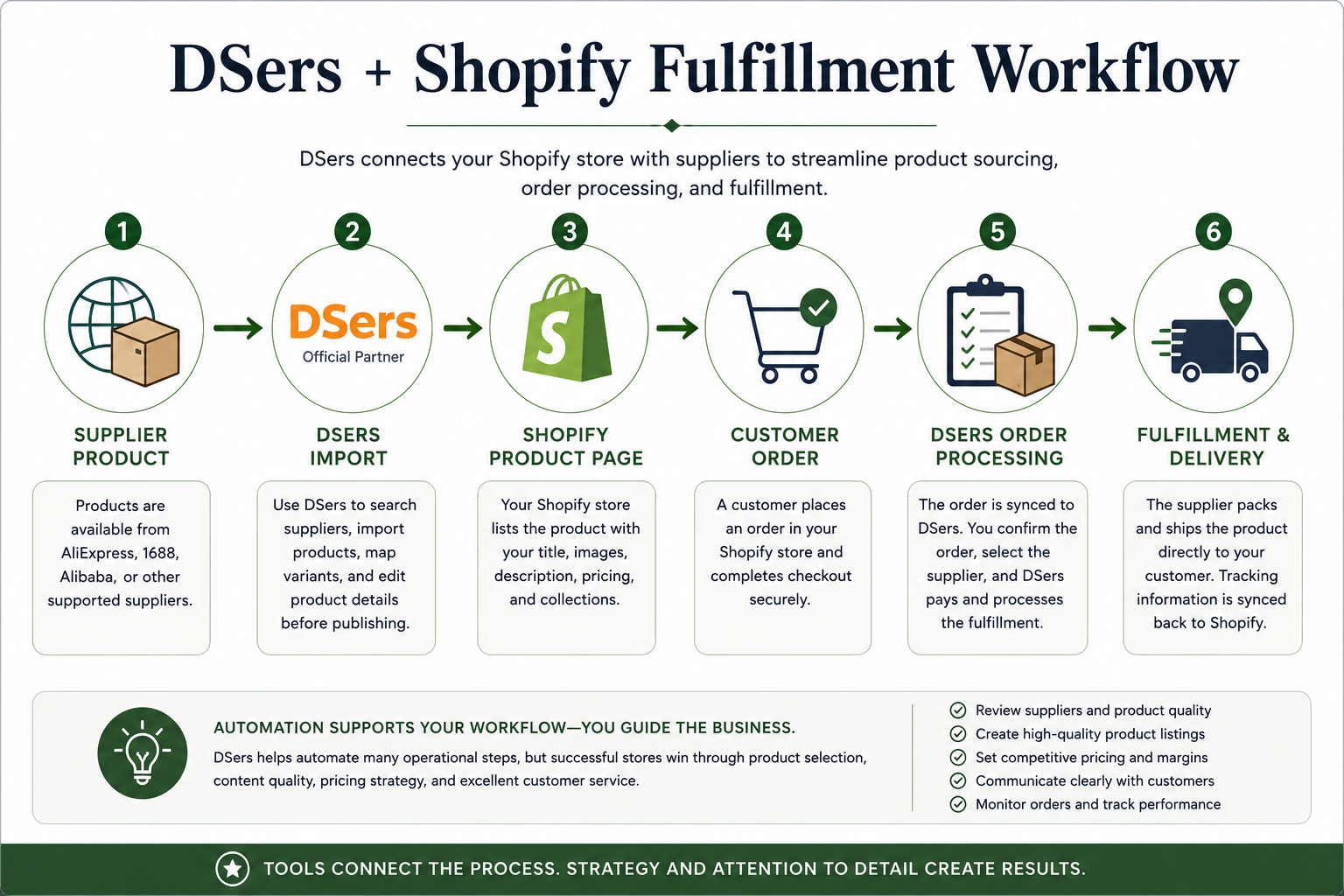
DSers is commonly used in dropshipping workflows to help connect product sourcing, product importing, supplier management, and order processing. In a Shopify context, it can serve as a bridge between the storefront and supplier-side fulfillment activity. This can reduce manual work, especially when managing multiple products or supplier connections.
However, DSers should not be understood as a tool that “runs the store.” It can support the workflow, but it does not replace the operator. The store owner is still responsible for choosing products, reviewing supplier information, setting prices, rewriting product content, checking variants, monitoring orders, and responding to customers.
The most useful way to think about DSers is as an operational tool. It may help with tasks such as importing products, mapping product variants, reviewing supplier options, syncing order information, and processing fulfillment steps. Those features can make a dropshipping workflow more manageable, but they do not eliminate the need for human review.
Imported product data should be treated as raw material, not finished store content. Supplier descriptions may be awkward, inconsistent, vague, overly promotional, or poorly translated. Product titles may be too long, too keyword-heavy, or unsuitable for a professional store. Images, variant names, specifications, and shipping details may require review before publication.
Automation should accelerate the process. It should not lower the standard.
Choose Products for Usefulness, Not Just Novelty
Product selection is one of the most important parts of building a Shopify store. New store owners often gravitate toward products that look unusual, viral, inexpensive, or visually interesting. Novelty can attract attention, but attention alone does not make a product suitable for a store.
A stronger selection process considers usefulness, audience fit, perceived value, supplier reliability, shipping feasibility, product images, variant complexity, and content clarity. A product should be easy to explain. Customers should be able to understand what it does, why it matters, how it is used, and whether it fits their needs.
A product may be poor fit if the benefits are unclear, the images are weak, the variants are confusing, or the claims require more support than the store can responsibly provide. Likewise, a product may create customer service problems if shipping times are unrealistic, sizing is unclear, or the item does not match the expectations created by the product page.
Useful product research should ask:
Does the product solve a clear problem?
Can the value be explained in plain language?
Are the images suitable for customer-facing use?
Are the variants easy to understand?
Are the specifications complete?
Is the shipping expectation reasonable?
Can the listing be written honestly without exaggeration?
Does the product fit the store’s broader identity?
Product selection and product writing are connected. If a product cannot be described clearly and responsibly, it may not be a good product to publish.
Rewrite Product Listings Before Publishing Them
Product listing quality is where many Shopify stores lose credibility. Imported descriptions often sound generic, awkward, repetitive, or exaggerated. Some are written primarily for supplier catalogs rather than retail customers. Others include weak phrasing, unclear specifications, or claims that should not be repeated without verification.
A strong Shopify product page should help a customer make an informed decision. It should explain what the product is, who it is for, how it is used, why it may be useful, what is included, and what details matter before purchase. The purpose is not to overhype the product. The purpose is to reduce confusion.
A stronger product page may include:
A clear product title
A short introductory description
Feature-benefit bullet points
Specific use cases
Materials or construction details
Size, measurement, or compatibility information
Care instructions, when relevant
Shipping or handling notes, when appropriate
SEO title and meta description
Image alt text
Frequently asked product questions
Product descriptions should convert technical features into customer-facing value. For example, instead of simply listing “foldable design,” the copy might explain that the product stores more easily in a drawer, bag, closet, or vehicle. Instead of saying “premium material,” the page should name the material when possible and explain why it matters.
Measurements should be especially clear. When relevant, it is often useful to include metric measurements with imperial equivalents, because customers may not all use the same measurement system. Clarity reduces hesitation.
For product listing support, review my page on Product Listing Writing or my Shopify Content and Store Support services.
Use AI Carefully for Product Content and Store Organization
AI can be useful in a Shopify workflow, but it should be used with discipline. It can help draft product descriptions, rewrite supplier copy, create title variations, organize product details, suggest collection descriptions, generate metadata drafts, and develop customer FAQ sections. It can also help create repeatable content templates, which is useful when managing multiple products.
The risk is that AI can also produce generic phrasing, unsupported claims, repetitive descriptions, or inaccurate product details. If the input is vague, the output will often be vague. If the product information is incomplete, the AI may fill gaps with assumptions. That is dangerous in e-commerce because customers rely on product pages to make purchase decisions.
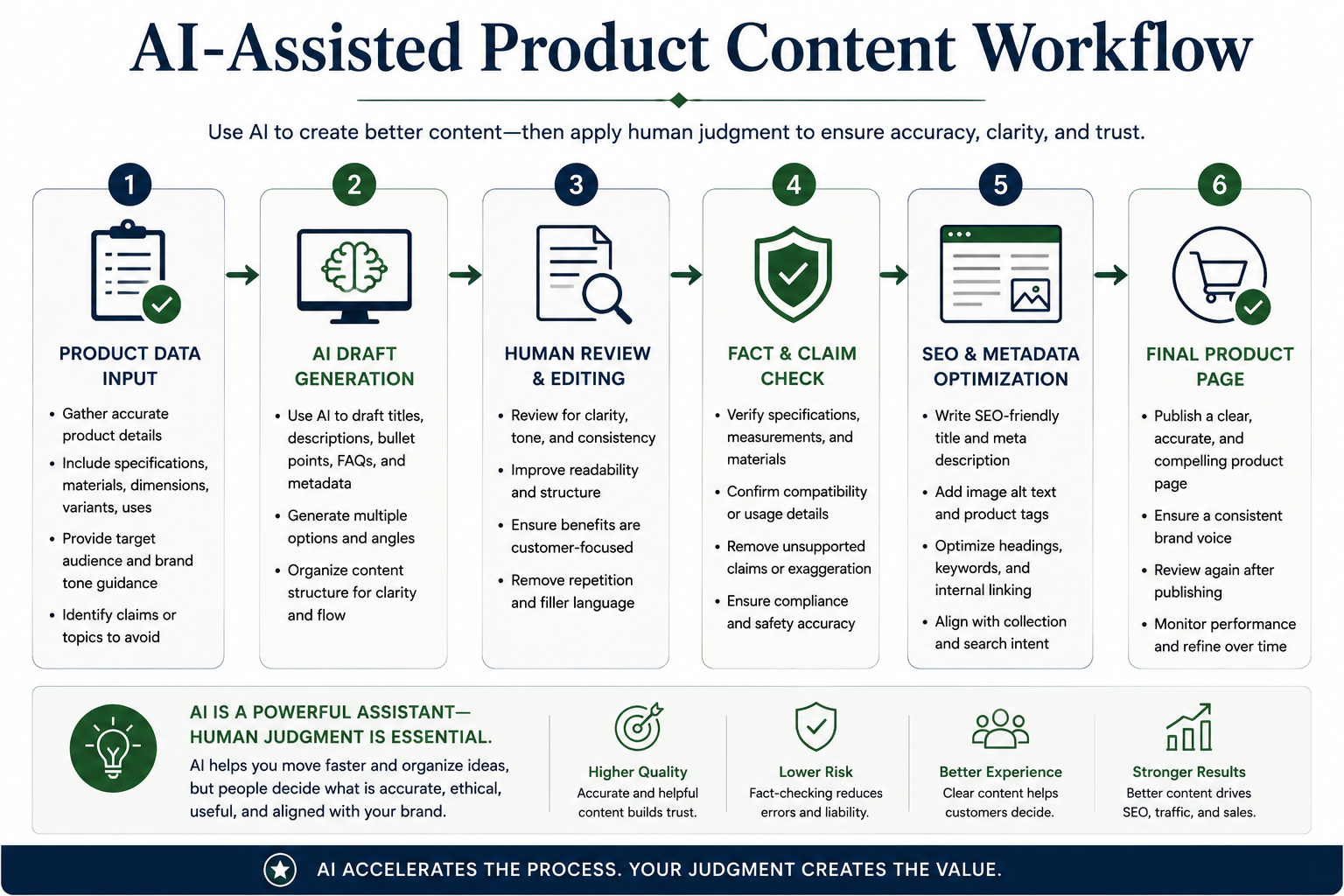
AI should be treated as a drafting and organization assistant, not as an autonomous publisher. The store owner should provide clear product information, target audience, tone requirements, measurements, materials, use cases, and prohibited claims. The output should then be edited for accuracy, clarity, and consistency.
A responsible AI-assisted workflow should include the following steps:
Provide accurate product information before drafting.
Ask for specific page sections rather than generic descriptions.
Review all claims manually.
Remove exaggerated language.
Check measurements, materials, compatibility, and variants.
Maintain a consistent store voice.
Edit every product page before publication.
For more on this type of process, review my page on AI-Assisted Content Strategy.
Connect the Workflow to a Real Shopify-Based Project
The reason Shopify, DSers, product content, and fulfillment workflows should be studied together is that they do not exist separately in real store operations. A store owner has to combine product research, product importing, page writing, metadata, pricing, collection structure, supplier review, and customer-facing communication into one coherent system.
One applied example of this kind of workflow is DailyFix Finds, my Shopify-based retail project connected to product research, store organization, product page development, metadata preparation, and practical e-commerce content work. A live store project is useful because it reveals the difference between abstract advice and operational reality. Products must be named, categorized, described, priced, reviewed, and presented in a way that makes sense to actual visitors.
A real store also exposes issues that a theoretical tutorial may overlook. Supplier descriptions may be inconsistent. Product images may vary in quality. Variants may need clearer names. Collections may need reorganization. Some products may appear useful at first but weaken the catalog after closer review. Pricing and margins may need adjustment. Product pages may require additional specifications before they are ready for publication.
That is why the strongest e-commerce workflow is not merely automated. It is reviewed, revised, and improved over time.
Prepare the Fulfillment and Customer Communication Workflow
Fulfillment automation is only one part of the customer experience. Even when DSers or another fulfillment tool supports order processing, the customer still needs clear communication. Shipping information, delivery expectations, return policies, contact options, and order updates should be understandable before the customer buys.
The public-facing store should align with fulfillment reality. If shipping times vary, the store should not imply instant delivery. If products may come from different suppliers, the operator should understand that separate items may have different timelines. If tracking updates depend on supplier processing, that should be monitored.
A store owner should also prepare basic customer service responses before orders begin. Customers may ask about shipping times, tracking numbers, returns, damaged items, missing items, sizing, product materials, or order changes. Having a clear process in advance reduces stress and improves professionalism.
Before launch, review:
Shipping settings
Return and refund policies
Supplier processing times
Tracking workflow
Customer service email access
Product-specific shipping notes
Order monitoring process
Refund and replacement procedures
Automation can reduce manual effort, but customer trust still depends on clarity, accuracy, and responsiveness.
Common Mistakes New Shopify Store Owners Should Avoid
Several common mistakes weaken Shopify stores before they have a chance to gain traction.
Importing too many products too quickly. A large catalog may look impressive, but it creates quality-control problems. Every product needs review, rewriting, categorization, pricing, metadata, and image checks. A smaller, cleaner catalog is often easier to manage.
Publishing supplier descriptions without revision. Supplier copy is rarely suitable as final retail copy. It may be awkward, unclear, repetitive, or inconsistent with the store’s tone.
Ignoring mobile display. Many visitors browse from mobile devices. Product pages, navigation, buttons, images, and checkout flow should be reviewed on smaller screens.
Using unclear categories. Customers need intuitive collections. Confusing navigation creates friction and makes the store feel unfinished.
Overpromising on shipping or product claims. Unsupported promises can damage trust. Product pages should be persuasive without becoming misleading.
Relying on automation without monitoring orders. Automation should be checked. Orders, supplier changes, tracking updates, and customer messages still require oversight.
Skipping metadata and SEO basics. Product titles, page titles, meta descriptions, headings, collection copy, and image alt text help organize the store for both users and search engines.
Treating AI-generated copy as final copy. AI drafts require human review, factual checking, and brand alignment before publication.
These mistakes are avoidable. Most of them come from moving too quickly without enough review.
Final Shopify Launch Checklist
Before launching or promoting a Shopify store, review the full system. A store is not ready simply because products are visible. It is ready when the customer experience, product content, fulfillment workflow, and operational structure have been checked.
Use this checklist before launch:
Define the store concept and target customer.
Choose product categories that fit the brand.
Set up essential Shopify pages.
Organize collections and navigation.
Connect DSers or the chosen fulfillment tool.
Review supplier information before publishing.
Rewrite product titles and descriptions.
Add specifications, measurements, use cases, and metadata.
Confirm pricing and margin logic.
Review shipping and return policies.
Test checkout and payment settings.
Check mobile display.
Prepare customer service templates.
Review every product page before launch.
Create a plan for ongoing updates.
This checklist will not solve every problem, but it forces the store owner to treat the business as an operating system rather than a collection of imported products.
Conclusion: Automation Helps, but E-Commerce Still Requires Judgment
A Shopify store can be supported by DSers, AI-assisted workflows, and structured automation, but the quality of the store still depends on human judgment. Product selection, product descriptions, supplier review, customer communication, pricing, branding, and revision all require active oversight.
The strongest e-commerce workflow combines tools with discipline. Shopify provides the storefront. DSers can support product importing and fulfillment organization. AI can assist with drafting and structure. Yet the store owner must still decide what belongs in the catalog, how products should be presented, and what customers need to know before purchasing.
For a practical example of these elements in a live e-commerce context, review DailyFix Finds, my Shopify-based retail project. Readers who need help with Shopify product pages, product descriptions, metadata, store organization, or AI-assisted content workflows can review my Shopify Content and Store Support services or contact me to discuss a project.