Amazon Ads for Authors: A Step by Step Guide to Profitable Book Campaigns
Amazon Ads puts your book in front of readers while they browse Amazon search results and book pages. For most authors, Sponsored Products does the heavy lifting. Amazon also offers Sponsored Brands for authors who meet eligibility rules through Author Central.
Getting Ready Before You Spend Money
Amazon Ads sends readers to a product page. Your product page must sell the book.
Use this checklist before launching ads:
Cover thumbnail reads fast in your genre
Subtitle includes genre terms readers type into Amazon
First two lines of the description hook fast
Series info stays consistent across all books
Look Inside formatting looks clean
Categories and keywords match your subgenre
If you publish through KDP, Amazon’s KDP help center recommends preparing the detail page and meeting book ad policy requirements before campaign launch.
The Metrics Authors Need
Amazon reports many numbers. Track five.
Impressions: ad views
Clicks: visits from ads
CTR: clicks divided by impressions
Sales: revenue attributed to ads
ACoS: ad spend divided by ad sales, shown as a percent
ACoS formula: ACoS = (ad spend ÷ ad sales) × 100
ROAS equals the inverse: ROAS = ad sales ÷ ad spend
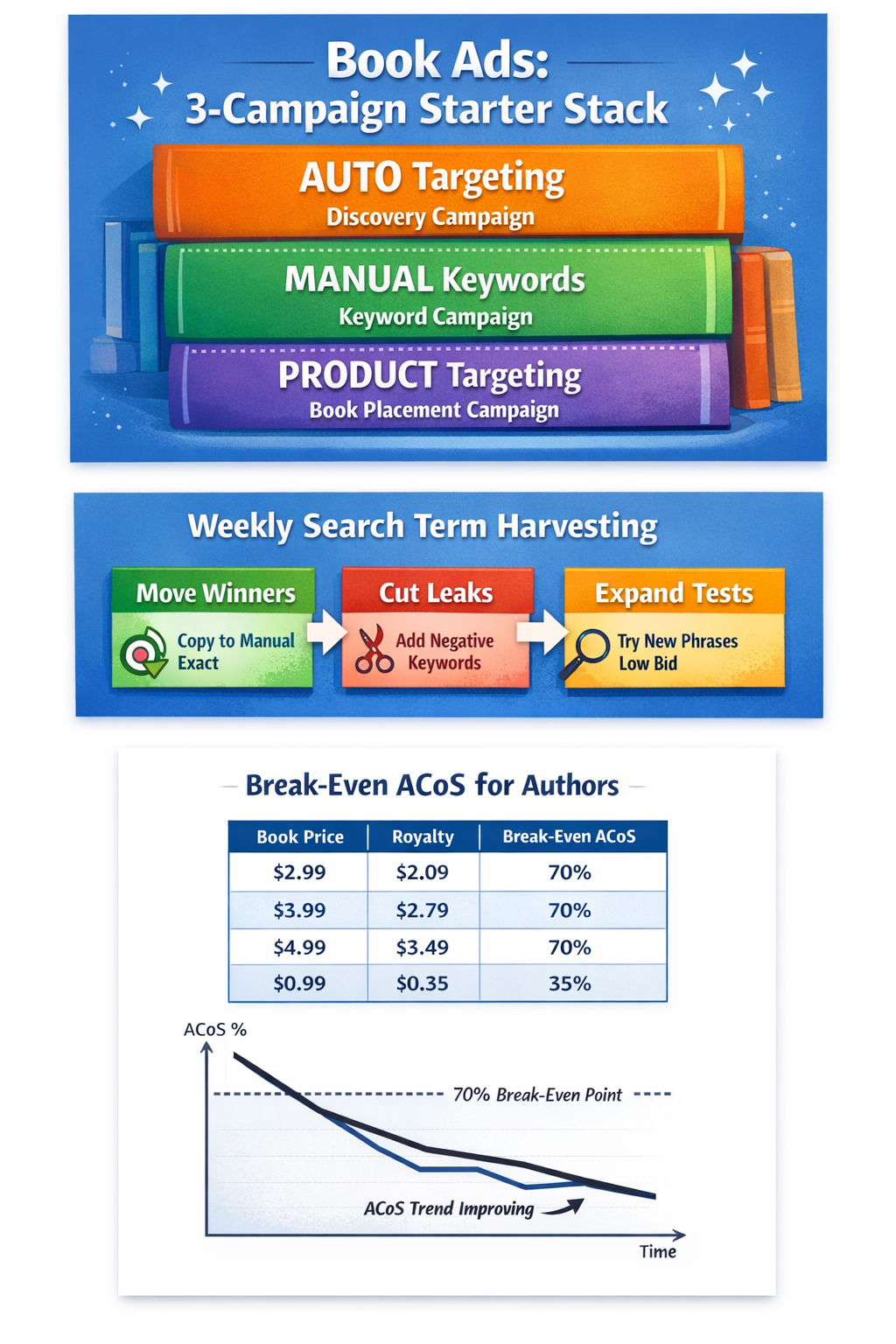
Break Even ACoS for Authors
ACoS uses revenue, not profit. Break even depends on royalty per sale.
A simple rule:
Break even ACoS percent ≈ (royalty per sale ÷ price) × 100
Example table for fast planning:
Price | Royalty | Break Even ACoS
$2.99 | $2.09 | 70%
$3.99 | $2.79 | 70%
$4.99 | $3.49 | 70%
$0.99 | $0.35 | 35%
Your First Three Campaigns
Start with three Sponsored Products campaigns. This structure keeps data clean and speeds learning.
Campaign 1: Sponsored Products Auto for discovery
Campaign 2: Sponsored Products Manual Keywords for control
Campaign 3: Sponsored Products Product Targeting for book to book placement
Amazon’s Sponsored Products guide outlines campaign creation and targeting options inside the campaign builder.
Step by Step: Sponsored Products Auto Campaign
Auto campaigns mine Amazon shopper behavior for targets. Use auto to collect search terms, then move winners into manual.
Open Campaign Manager in Amazon Ads and select Create campaign, then Sponsored Products.
Name the campaign with a repeatable pattern.
Example: SP Auto | US | Series Name | Book 1 | 2025 12 17Set a daily budget you feel fine holding for seven days.
Choose automatic targeting.
Amazon auto-targeting uses targeting groups, including options such as close match and loose match, as well as related product behavior.Pick a bidding strategy and set default bids.
Launch the campaign.
Amazon’s Sponsored Products setup flow lists these steps inside the campaign builder.
Step by Step: Manual Keyword Campaign
Manual keywords give direct control over search terms and match types.
Create a new Sponsored Products campaign.
Choose Manual targeting, then Keyword targeting.
Add keywords across match types.
Amazon defines three keyword match types for Sponsored Products: broad, phrase, and exact.
A simple keyword structure:
Exact match for high intent terms
Phrase match for controlled expansion
Broad match for discovery
Start with 20 to 40 keywords pulled from:
your subtitle and description terms
comparable authors
comparable titles and series namessubgenre tropes
Set bids by match type.
Amazon notes that different match types behave differently, so bid rules often differ across broad, phrase, and exact.
Step by Step: Product Targeting Campaign
Product targeting places your book on other product detail pages. Authors often use product targeting to show Book 1 on similar Book 1 pages.
Create a new Sponsored Products campaign.
Choose Manual targeting, then Product targeting.
Add targets:
comparable books in your niche
similar price range
similar format, ebook versus paperback





Bids, Placements, and Match Types
Match Types in Plain English
Broad match reaches the widest set of searches. Amazon notes that broad match can include variations, synonyms, and related terms, based on meaning and context.
Phrase match requires the phrase in order, with extra words before or after, based on Amazon match type rules.
Exact match stays tight. Amazon describes an exact match as a close version of the keyword sequence, including close variants.
Negative keywords stop waste
Sponsored Products supports negative targeting, including negative keyword options. Use negatives after the search term data appears.
Placements
Sponsored Products placements include areas such as top of search and product pages. Amazon supports placement controls and bid adjustments tied to placements.
A simple placement rule:
Raise the top of the search only after ACoS stays under break even for seven days
Keep product page placements running for discovery
Weekly Optimization Routine
Run this routine once per week. Keep changes small, then let data settle.
Step 1: Pull search term data
Look for search terms from auto campaigns and broad or phrase keywords.
Step 2: Promote winners
If a search term produces orders, add the term to the manual as an exact match, then lower auto bids slightly to reduce duplicate bidding.
Step 3: Add negatives
If a search term produces clicks with no sales and poor relevance, add a negative phrase or a negative exact.
Step 4: Adjust bids
Raise bids on terms with stable orders and healthy ACoS.
Lower bids on terms with high spend and weak returns.
ACoS remains the simplest efficiency metric inside Amazon Ads, defined as spend divided by ad sales.
Scaling Rules
Once campaigns show stable results, scale with rules, not mood.
Rule 1: Scale budgets after conversion proves stable
Increase the daily budget by 10 to 20 percent once per week on winning campaigns.
Rule 2: Split campaigns by goal
Discovery campaigns: auto, broad, product targeting.
Control campaigns: exact match winners.Rule 3: Add a defensive campaign for author name terms
Bid on your author name and series name to protect branded searches.
Common Problems and Fixes
Problem: Clicks with no orders
Fix path:
Tighten targeting by moving broad terms into phrase or exact
Check price and cover signal against your niche
Rewrite the first two lines of the description for a stronger hook
Problem: Spend stays near zero
Fix path:
Raise bids until impressions arrive
Add more targets in product targeting
Confirm book availability in the target marketplace
Amazon notes that books must be available in the country where ads run, and books must appear in Author Central for author advertising guides.









Problem: High ACoS on Book 1
Fix path:
Track series read-through. Book 2 and Book 3 revenue often pay back Book 1 spend.
Keep exact-match winners; cut weak discovery terms.
Sponsored Brands for Authors
Sponsored Brands offers additional placements for authors. Amazon’s author-focused Sponsored Brands guide lists a common requirement: three or more eligible titles under the same author name, with those titles present in Author Central.
KDP’s help page for advertising also states that creating a Sponsored Brands campaign requires at least one pen name with three unique titles in Author Central.
Add Sponsored Brands after Sponsored Products shows stable winners. Use keywords already proven in Sponsored Products.

A reader magnet can help authors turn casual visitors into email subscribers. This guide explains how to prepare a reader magnet, upload it to BookFunnel, create a signup page, connect an email platform, test delivery, and use the offer as part of a professional author platform.